
A Simple Social Media Content Calendar System for Small Brands
A lightweight weekly system for planning social media content using content pillars, batching and a single spreadsheet, without burning out.
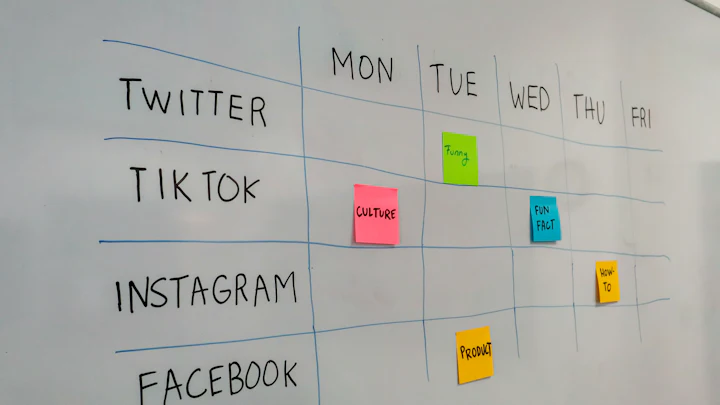
Most small brands don't fail at social media because their ideas are bad. They fail because posting depends on someone finding time and inspiration every single day, and eventually they don't.
A content calendar fixes that by separating deciding what to post from posting it. Here's a simple system that works for a team of one to three people.
Step 1: Pick three to five content pillars
Content pillars are the recurring themes your account is about. They keep you consistent and make planning faster, because you're never starting from a blank page.
For a neighbourhood bakery, pillars might be:
- Behind the oven: process, ingredients, early mornings.
- This week's bakes: products, specials, pre-orders.
- Our regulars: customer stories and reposts, with permission.
- Baking tips: simple techniques people can try at home.
Each pillar should serve a purpose: building trust, selling, community or teaching. If a pillar doesn't serve one, drop it.
Step 2: Choose a realistic rhythm
Consistency beats volume. Three good posts a week that you can keep up for a year will do more than daily posting that stops in three weeks.
A sample week:
- Monday: teaching post (carousel or short video)
- Wednesday: behind-the-scenes (Stories or Reel)
- Friday: product or offer post
- Daily, if you can: Stories that take five minutes
Step 3: Build the calendar in one spreadsheet
You don't need special software to start. Create a sheet with these columns:
- Publish date
- Platform
- Pillar
- Format (Reel, carousel, photo, Story, text)
- Hook or headline
- Caption draft
- Asset link (where the photo or video lives)
- Status (idea → drafted → designed → scheduled → posted)
- Result notes (filled in a week later)
The status column matters most. At a glance it tells you what's stuck.
Step 4: Batch the work
Batching means doing similar tasks together:
- Monthly (1 hour): brainstorm ideas for each pillar and drop them into the sheet.
- Weekly (2 hours): write the week's captions in one sitting.
- Weekly (1–2 hours): shoot photos and short videos together. Good light once beats bad light five times.
- Weekly (30 minutes): schedule everything using the platform's own scheduler (Meta Business Suite, LinkedIn's native scheduling) or a tool you already use.
Step 5: Review, but don't obsess
Once a month, look at which posts led to what you actually care about: saves, shares, profile visits, website clicks, enquiries. Likes are the weakest signal. Ask:
- Which pillar drove the most meaningful actions?
- Which formats performed best for the effort they took?
- What should we make more of, and what should we stop?
Shift next month's calendar towards what worked.
Don't forget where the clicks land
Social posts often send people to your website, and links shared in DMs and groups show a preview card built from your site's tags. Run your key pages through our social share check to make sure those previews look right, and read why Open Graph tags matter.
A starter checklist
- Three to five pillars, written down
- A posting rhythm you can keep for 12 weeks
- One spreadsheet with a status column
- A weekly batching slot in your calendar
- A monthly 30-minute review
That's the whole system. The tools can get fancier later. The habit is what counts.

State of Marketing publishes practical, independently researched guides on marketing, SEO and brand building. How we write and review articles.